Hunting Simulator 3 maps: Colorado Exploration Guide
Explore Hunting Simulator 3 maps with confirmed Colorado details, demo limits, vehicle information, and practical wildlife scouting tips.
What’s Confirmed About Hunting Simulator 3 Maps?
A huge hunting reserve is only useful if you know where to start looking. Understanding Hunting Simulator 3 maps helps you spend less time wandering and more time finding wildlife, planning approaches, and learning productive areas. This guide to Hunting Simulator 3 maps separates confirmed Colorado details from early player experience, so you can explore without mistaking pre-release theories for established mechanics.
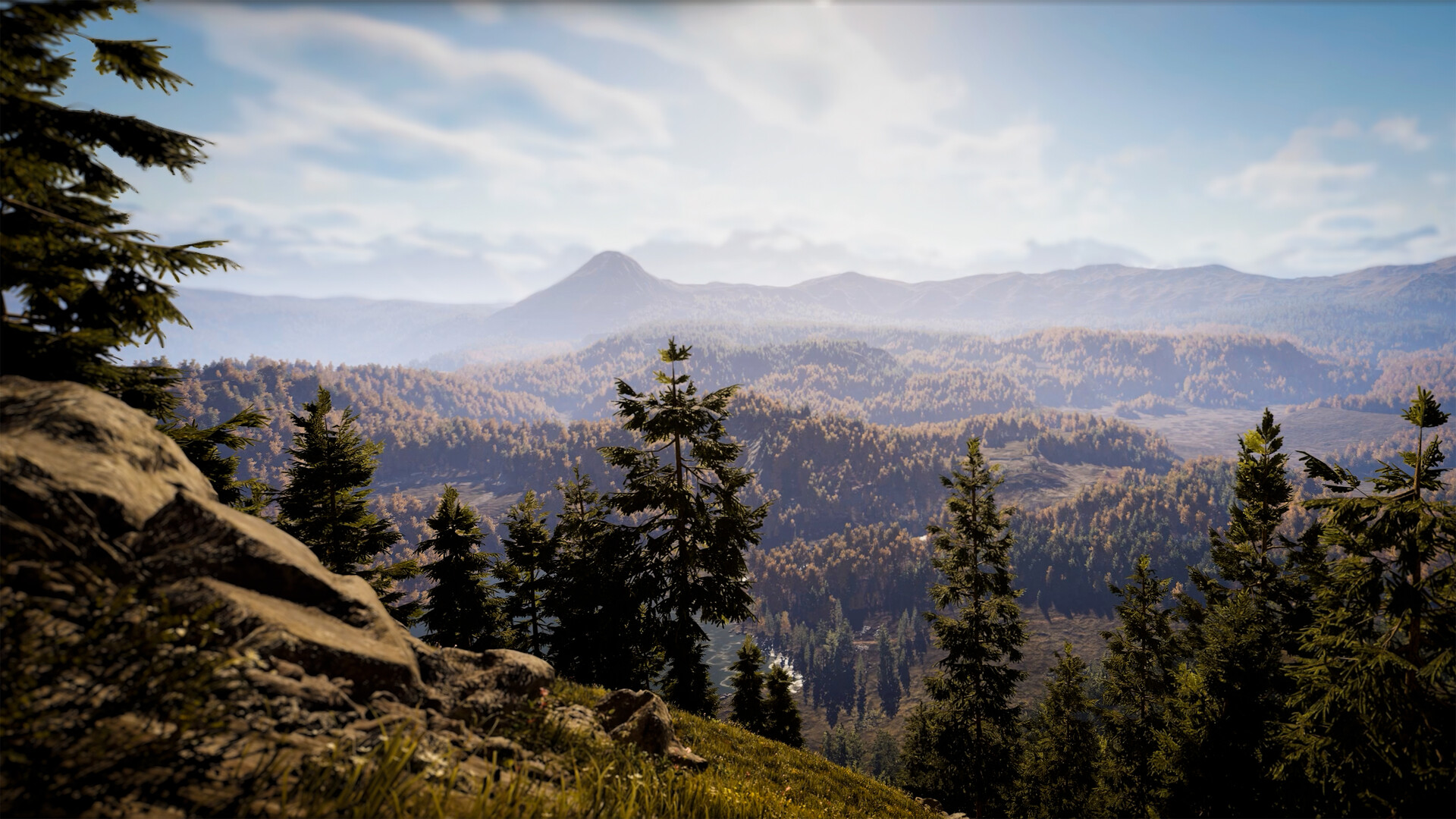
Official screenshot · Source: Steam store
As of October 26, 2026, Colorado is the named map confirmed in the reference announcements. Those sources do not establish the complete launch map count, exact reserve boundaries, or a full list of future locations.
The full game is scheduled to launch on October 29, 2026, for PC, PlayStation 5, and Xbox Series X|S. Until then, it is important to distinguish the restricted Steam demo from footage recorded in other pre-release builds.
| Map question | What the available information establishes |
|---|---|
| Which location is named? | Colorado |
| Can you explore the entire Colorado map in the demo? | No; the demo provides access to a restricted portion |
| How large are the maps? | NACON describes them broadly as spanning tens of square kilometers |
| Is an exact Colorado area confirmed here? | No |
| Is the complete launch map list established? | No |
| Are additional DLC maps confirmed here? | No; community requests are not announcements |
NACON’s official Hunting Simulator 3 vehicle overview provides the broad map-scale description and explains why off-road transportation is being introduced.
That scale makes exploration planning worthwhile. However, “tens of square kilometers” is not a precise measurement, and it should not be converted into an invented area figure for Colorado.
Colorado Map and Demo: What You Can Explore
Colorado is the best starting point for learning the game’s navigation and wildlife tracking. The official demo announcement describes access to the starting headquarters, a shooting range, and part of the Colorado reserve.
The first mission is A Matter of Rabbits. Players can also choose a Retriever or Hound for tracking and try a Polaris UTV.
Treat this version as a practice environment rather than a place to build a lasting trophy collection. The announcement specifically states that demo progress is not saved and hunts do not award in-game currency.
Demo access versus broader game information
| Feature | Steam demo information | Planning takeaway |
|---|---|---|
| Colorado exploration | Restricted area available | Do not interpret the accessible boundary as the full reserve |
| Headquarters | Starting HQ accessible | Learn the basic departure routine |
| Shooting range | Available | Practice before spending time tracking |
| First mission | A Matter of Rabbits | Use it to learn the opening hunting workflow |
| Hunting dogs | Retriever or Hound | Try the available tracking options |
| Vehicle | Polaris UTV available | Test navigation across the accessible area |
| Saved progress | Not retained | Prioritize learning over accumulation |
| Hunting income | No in-game currency awarded | Do not use demo sessions to estimate earnings |
The latest announcement in the collected material extends Steam demo availability until the October 29 launch. An earlier post listed October 26, so the later notice is the relevant update.
Understand the license limitation
The demo announcement identifies three licensed species but does not name all three in the supplied text. It also distinguishes animals that can be hunted and bagged from other wildlife present in the reserve.
The practical lesson is simple: seeing an animal does not automatically mean you can claim it under the demo’s rules. Check the available license information before committing to a hunt.
For your first session, follow this sequence:
- Visit the range and practice your chosen equipment.
- Start the opening mission.
- Test your dog’s tracking tools.
- Drive a short reconnaissance route.
- Finish with an on-foot wildlife observation session.
This approach turns limited access into useful preparation for exploring Hunting Simulator 3 maps after release.
Getting Around: Vehicles, Routes, and Landmarks
Large reserves create a trade-off: walking lets you inspect an area closely, while driving helps you reach distant terrain faster. NACON’s vehicle announcement presents off-road transportation as a solution to long journeys across the maps.
The announcement says UTV and SUV options will be available at launch, acquired through the in-game store and accessed from the garage. Its illustrated lineup includes several Kawasaki models and a Polaris Ranger EV.
Because that announcement dates to February 2025, use it as an announced feature overview rather than a guarantee of every final launch-menu detail.
| Transportation detail | Announced information |
|---|---|
| Vehicle categories | UTV and SUV |
| Acquisition | In-game store |
| Access point | Garage |
| Kawasaki examples | MulePro FX EPS LE, MulePro FXT 1000 LeRanch, Teryx S LE |
| Polaris example | Ranger EV |
| Demo driving option | Polaris UTV |
Build routes around recognizable terrain
When learning Hunting Simulator 3 maps, a repeatable route is more useful than aimless mileage. Pick a small circuit with landmarks you can recognize again: a road junction, bridge, open field, or another distinctive feature you encounter.
Early player experience includes deer moving across a bridge and bucks traveling through fields. Those observations make these features worth watching, but they do not establish guaranteed wildlife crossings or fixed trophy locations.
A practical scouting loop has three parts:
- Travel leg: Reach the general area efficiently.
- Observation stop: Pause somewhere with a useful view.
- Walking leg: Inspect nearby ground and approach wildlife deliberately.
Use vehicles for relocation, then explore promising ground on foot. This is a scouting recommendation, not a claim about a confirmed vehicle-noise radius; the supplied sources do not quantify how vehicles affect nearby animals.
Keep the first route small enough to repeat. Familiarity with one productive corner is more valuable than briefly visiting every accessible road.
Wildlife Zones: What Early Player Experience Shows
The most useful map knowledge is not just where a field sits, but what appears there over multiple visits.
In the supplied pre-release video, player experience includes white-tailed deer, rabbits, and ducks in the explored area. The creator repeatedly watches a feeding area and encounters different apparent deer groupings, including solitary bucks and groups containing does.
That footage provides scouting ideas, not a complete species distribution map. It also does not conclusively identify the location of every sighting or establish how animal groups are assigned to zones.
| Early player observation | What remains uncertain | Useful response |
|---|---|---|
| Different deer groupings appear near one feeding area | Whether multiple herds share that zone | Record several visits before assuming a fixed group |
| A buck becomes difficult to relocate | Whether it moved, separated, or was confused with another animal | Search nearby terrain and compare identifying details |
| Returning to the map leads to another sighting | Whether re-entry reliably changes availability | Treat it as a troubleshooting experiment |
| Apparent ages change between sightings | Whether the same individual is being observed | Track antler shape and group composition too |
| Several bucks earn gold trophies | Whether those results repeat elsewhere | Avoid treating one area as a guaranteed trophy farm |
Track sightings instead of assuming respawns
A simple sighting log can prevent confusion. Record:
- Location or nearest landmark
- In-game observation time
- Species and group size
- Displayed age, when available
- Genetic potential, when shown
- Distinctive antler shape or asymmetry
- Whether you fired during that visit
This is especially useful when two bucks have similar antlers. A younger-looking animal at the same location does not, by itself, prove that your original target aged backward or was replaced.
Do older bucks leave their groups?
The creator reads a field-journal entry describing white-tailed deer family groups and the tendency of adult bucks to become more solitary outside the mating season.
That offers a reasonable scouting clue: look beyond the main group when searching for a mature buck. However, the player’s suggestion that bucks separate at a particular age remains an interpretation, not a verified gameplay threshold.
The same caution applies to aging. The creator initially suspects that three in-game days produce a year of growth, then encounters contradictory age readings. There is no reliable aging formula established by this footage.
A Practical Scouting Plan for Hunting Simulator 3 Maps
You do not need exact spawn coordinates to make progress. A structured survey helps you learn the reserve while avoiding unsupported assumptions about population resets, trophy farming, or daily schedules.
Use a five-step survey
| Step | Action | What to record |
|---|---|---|
| 1. Select an area | Choose one manageable section of accessible terrain | Landmarks and route |
| 2. Observe first | Watch before firing | Species, group size, travel direction |
| 3. Check nearby ground | Walk beyond the first sighting | Additional animals and possible approaches |
| 4. Return later | Revisit under comparable conditions | Similarities and differences |
| 5. Adjust | Keep useful stops and replace unproductive ones | A more efficient scouting circuit |
For example, suppose you see does and a promising buck beside a field. Rather than immediately advancing time several days, note the buck’s displayed information and antler characteristics. On the next visit, compare the entire group—not just the largest deer.
If the buck is absent, expand your search before concluding that it died or despawned.
Separate scouting from trophy attempts
Early player experience shows several gold-scoring deer, but no confirmed platinum harvest in the supplied video. High genetic potential and a larger displayed age should therefore not be presented as automatic platinum guarantees.
For a dedicated trophy attempt:
- Identify the animal carefully before shooting.
- Check equipment and license requirements.
- Choose a clear shot rather than rushing the encounter.
- Record the harvest result to improve future comparisons.
Photo mode also appears in the pre-release footage, where the creator uses it to inspect animals and animations. It may be useful for documenting distinctive features, although its final restrictions are not established here.
The strongest approach to Hunting Simulator 3 maps is to build a record of repeat observations. That remains useful even if launch updates change behavior seen in pre-release footage.
FAQ: Hunting Simulator 3 Maps
How many Hunting Simulator 3 maps are confirmed?
The supplied official material names Colorado but does not establish the complete launch map count. NACON refers to maps in the plural, yet that wording alone is not enough to publish a definitive location list.
How big is the Colorado map?
NACON broadly describes Hunting Simulator 3 maps as covering tens of square kilometers. The supplied sources do not provide an exact Colorado measurement. The Steam demo contains only a restricted portion, so its playable boundaries should not be used to estimate the full reserve.
Does progress carry over from the Steam demo?
The official announcement states that demo progress is not saved and hunts do not award in-game currency. Use the demo to practice shooting, tracking, and navigation rather than expecting to preserve trophies or build funds for launch.
Are there guaranteed trophy locations or confirmed DLC maps?
Neither is established by the supplied material. Early player experience shows repeated gold trophies in one explored area, but no guaranteed coordinates or universal farming method. Community reports asking about future maps are requests, not confirmation of a DLC roadmap.
Related Guides
Hunting Simulator 3 animal list: Texas & Colorado
Explore 18 reported Texas animals, officially revealed Colorado wildlife, and species-count caveats in this Hunting Simulator 3 animal list.
Hunting Simulator 3 dogs: Breeds, Baying, and Tracking
Compare Hunting Simulator 3 dogs, learn how hound baying and tracking work, and check breed bonuses, demo tips, and prelaunch limitations.
Hunting Simulator 3 simfauna: Wildlife Explained
Learn how Hunting Simulator 3 SimFauna handles animal aging, DNA, herd leaders, and predators, plus practical tips for planning your hunts.
Hunting Simulator 3 early access: Demo & Release Guide
Hunting Simulator 3 early access explained: Steam demo availability, October 29 release, platforms, PC specs, and what preview gameplay reveals.
Hunting Simulator 3 PC: Release, Specs & Steam Guide
Get Hunting Simulator 3 PC release details, system requirements, Steam demo availability, controller support, and practical hunting tips.